Every fact that names a number or a policy on this page is either sourced to a linked primary document or written as an observation with the method stated. Nothing is asserted as a ranking percentage, because no such number exists publicly.
Search Engine Basics: How Search Engines Actually Work
A search engine is a system that discovers pages on the web, stores a processed copy of them in an index, and returns an ordered list of those pages in answer to a query. Three things have to be true at once: it crawls the web itself, it keeps its own index, and it ranks results rather than merely filtering them. Remove any one of those and you have a search interface, not a search engine.
That definition is the whole of search engine basics compressed into a sentence, and the rest of this page unpacks it. You will find how search engines work stage by stage, what actually sits inside the index, how ranking algorithms score what retrieval returns, what a SERP is and what each part of one is called, why a web browser is a different category of software entirely, and what any of this changes about the way you publish.
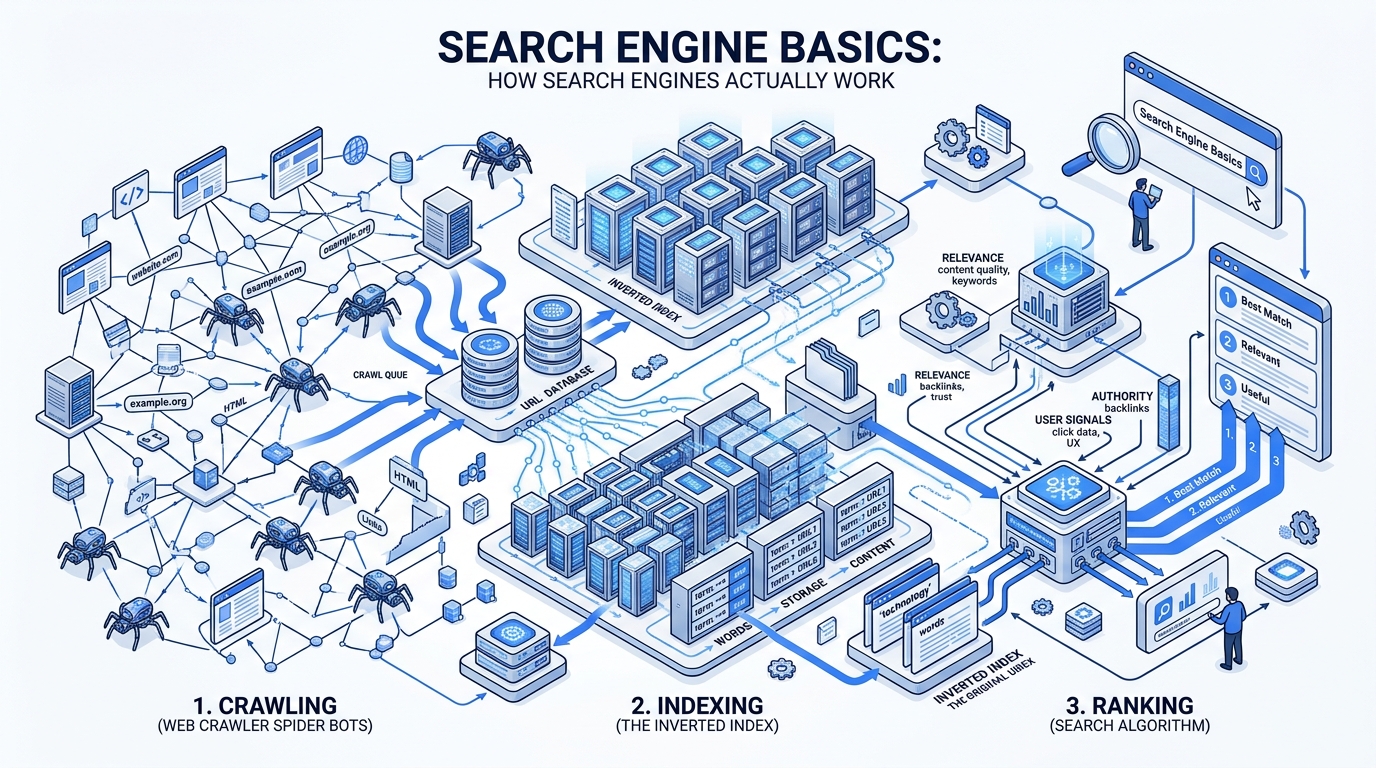
Table of Contents (Click to expand 17 sections)
- 01.The short version
- 02.The interactive search pipeline
- 03.What a search engine is, and what it is not
- 04.The components of a search engine
- 05.How search engines work: the five stages, in order
- 06.What actually happens inside the index
- 07.Search engine algorithms: how ranking decides the order
- 08.What is a SERP? The anatomy of a results page
- 09.The search engines themselves: who actually has an index
- 10.AI search: what changed and what did not
- 11.How to rank higher in Google: the basics that actually apply
- 12.How to build a small search engine yourself
- 13.Four controls people confuse
- 14.Check your own site in fifteen minutes
- 15.Myths, with sources
- 16.Frequently asked questions
- 17.Start here: the learning path
The short version
- Search runs as a pipeline: discovery, crawling, rendering, indexing, then retrieval and ranking. Each stage can only work on what the previous stage handed it.
- Being crawled is not being indexed, and being indexed is not ranking. Most visibility problems are one specific stage failing, and the fix differs for each.
- The index is an inverted index: it maps terms to the pages containing them. That data structure is the only reason a query can be answered in milliseconds.
- A SERP — search engine results page — is no longer a list of ten blue links. Organic results now share the page with ads, snippets, packs, panels and generated answers, and understanding the anatomy of a SERP matters more than any single ranking number.
- A browser and a search engine are not the same thing. Chrome, Safari, Firefox and Edge fetch one document you already have the address for. Google, Bing and Brave Search find you the address.
- AI features sit on top of the same index. If a page cannot be retrieved, it cannot be summarised or cited, so the ordinary requirements still apply.
Watch a page travel through the pipeline
Six pages, one crawler, and every failure that happens to real sites: an orphan nothing links to, a URL that 404s, a page whose JavaScript never renders, and one carrying a noindex directive. Press run and follow it stage by stage.
Not started
Press run to send six pages through discovery, crawling, rendering, indexing and retrieval.
What a search engine is, and what it is not
The definition at the top of this page is deliberately narrow, because the word is used loosely enough to be useless. A great many products search something. Very few of them crawl the web, build their own index of it, and score the results by relevance. Those three capabilities together are what make something a web search engine rather than a search box.
The distinction is not pedantry. It determines what you can influence. If a product serves results licensed from another company's index, then being indexed by that company is the actual requirement, and optimising separately for the interface achieves nothing. The index breakdown below sorts the market on exactly this line.
The table below sets the search engine against the four things it is most often confused with. The column that matters most is the third one: whether the system maintains an index of its own.
| Question | Search engine | Web browser | Web directory | Database | Answer engine |
|---|---|---|---|---|---|
| What it does | Crawls, indexes and ranks pages by relevance to a query | Requests and renders one document you already have the address for | Presents a human-curated list of sites by category | Returns every record matching a condition you specify | Generates a written answer from retrieved documents |
| Example | Google, Bing, Brave Search, Mojeek | Chrome, Firefox, Safari, Edge | Early Yahoo Directory, Curlie | PostgreSQL, MySQL | AI Overviews, AI Mode, Perplexity |
| Has its own index | Yes, by definition | No | No — a curated list, not an index | Yes, but of your data only | Usually not its own; it retrieves from one |
| Answers or links | Links, increasingly with answers above them | Neither | Links | Records | Answers, with links to sources |
| Ranks results | Yes — scores and orders them | No | No — alphabetical or editorial order | No — filters, does not score | Ranks the sources it chooses to cite |
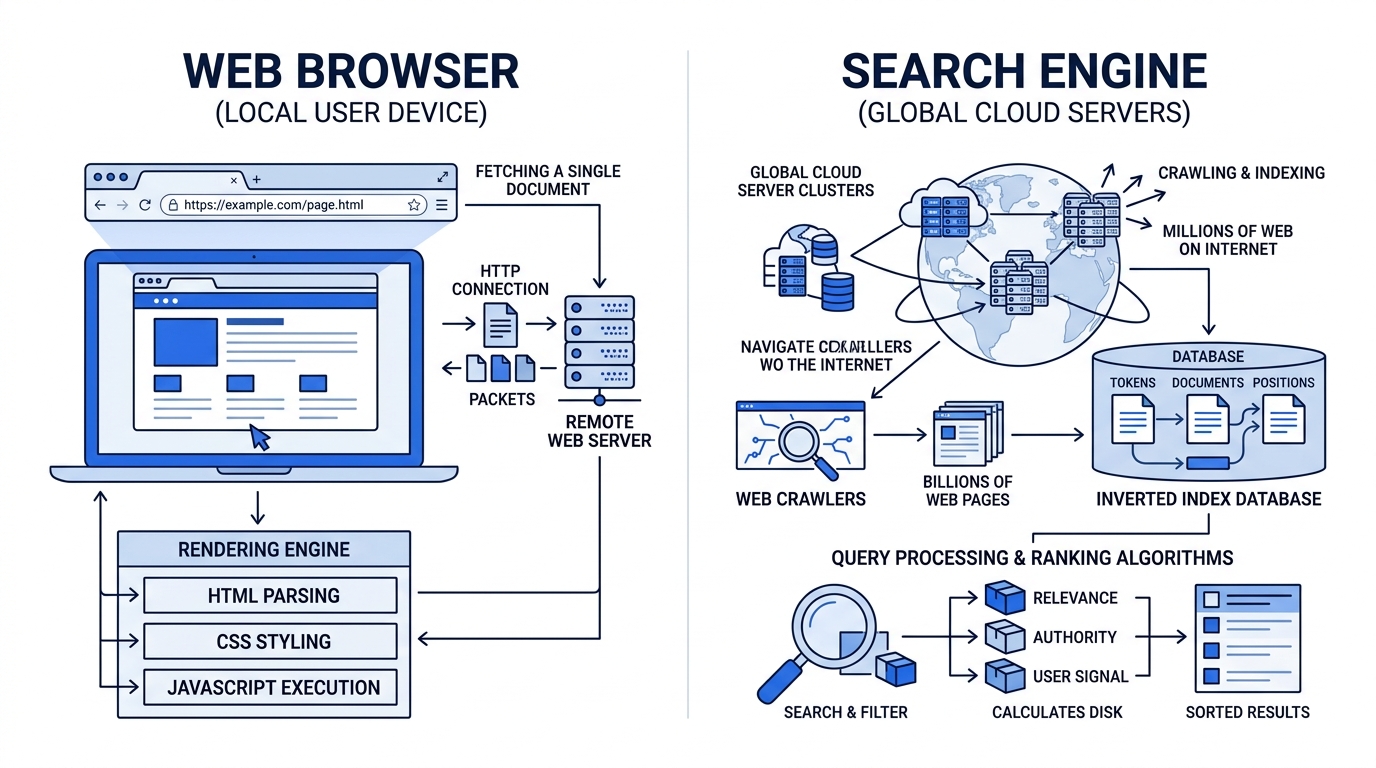
Search engine vs web browser: the difference, with examples
This is the single most searched confusion in the whole topic, so it is worth being blunt. A browser and a search engine are not the same thing, and Google is a search engine — Chrome is the browser Google makes.
A web browser is software installed on your device. Its job is to take a URL, request that document over HTTP, render the HTML, CSS, JavaScript and images it receives, and show you the result. It stores no index of the web. Ask a browser what pages discuss sourdough starters and it has no idea, because it has never looked at any page except the ones you asked it for.
A search engine is a service running on someone else's infrastructure. Its job is to have already visited the web, kept a processed record of what it found, and be able to hand you an ordered list of addresses when you ask a question. It has no way to display a page to you; it gives you a link, and your browser does the displaying.
You reach a search engine through a browser, which is exactly why the two get conflated. Typing "weather" into Chrome's address bar sends the text to your default search engine and shows you its results — two products, one box. The difference between a search engine and a web browser is the difference between a librarian and a pair of hands: one knows where the book is, the other carries it to you.
| Property | Web browser | Search engine |
|---|---|---|
| Where it runs | On your device | On the provider's servers |
| What it needs from you | A URL | A query |
| What it gives back | A rendered page | A ranked list of URLs |
| Keeps an index of the web | No | Yes |
| Examples | Chrome, Safari, Firefox, Edge, Opera, Brave Browser | Google, Bing, DuckDuckGo, Brave Search, Baidu, Yandex |
| Can you use one without the other | Yes — type a URL directly | Not really — you view results in a browser or app |
Note on branding: Brave ships both a browser and a search engine under the same brand. Same company, two different categories of product.
The components of a search engine
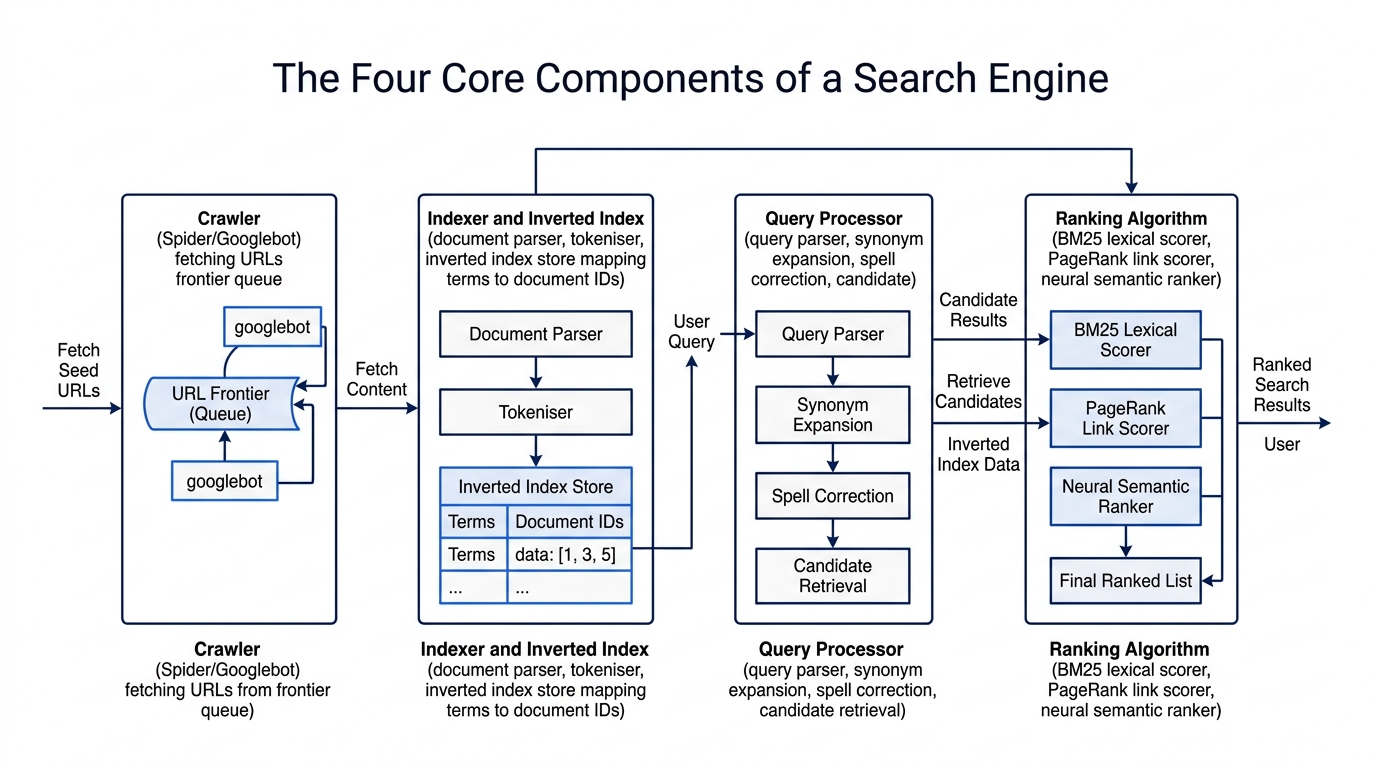
Every textbook on information retrieval converges on four core components that make up the retrieval machinery.
Ask what the parts of a search engine are and you will get answers ranging from three to seven, because people split the same pipeline at different points. The version that holds up — and the one every textbook on information retrieval systems converges on — has four components.
| # | Component | Also called | What it is responsible for |
|---|---|---|---|
| 1 | Crawler | Spider, bot, robot, Googlebot | Discovering URLs and fetching what is at them, within the limits robots.txt and its own politeness rules impose |
| 2 | Indexer and index | Inverted index, document store | Parsing and rendering what was fetched, tokenising the text, and writing it into a structure that can be queried in milliseconds |
| 3 | Query processor | Query parser, retrieval engine | Interpreting what the user typed — correcting, expanding, understanding intent — and pulling the matching candidate set out of the index |
| 4 | Ranking algorithm | Scorer, relevance model | Ordering that candidate set by how well each document answers this specific query for this specific user |
A fifth part is usually added when the question is about the product rather than the system: the interface — the search box and the results page that the user actually touches. It is not part of the retrieval machinery, but it is the part that decides what a searcher sees, so any working of a search engine diagram normally shows it as the last box.
The useful thing about this four-part breakdown is that it maps one-to-one onto failure modes. If your page is missing, exactly one of these components is the reason: the crawler never fetched it, the indexer discarded it, the query processor decided your page is not a candidate for that query, or the ranking algorithm scored it below everything on page one. Four components, four diagnoses, four different fixes.
How search engines work: the five stages, in order
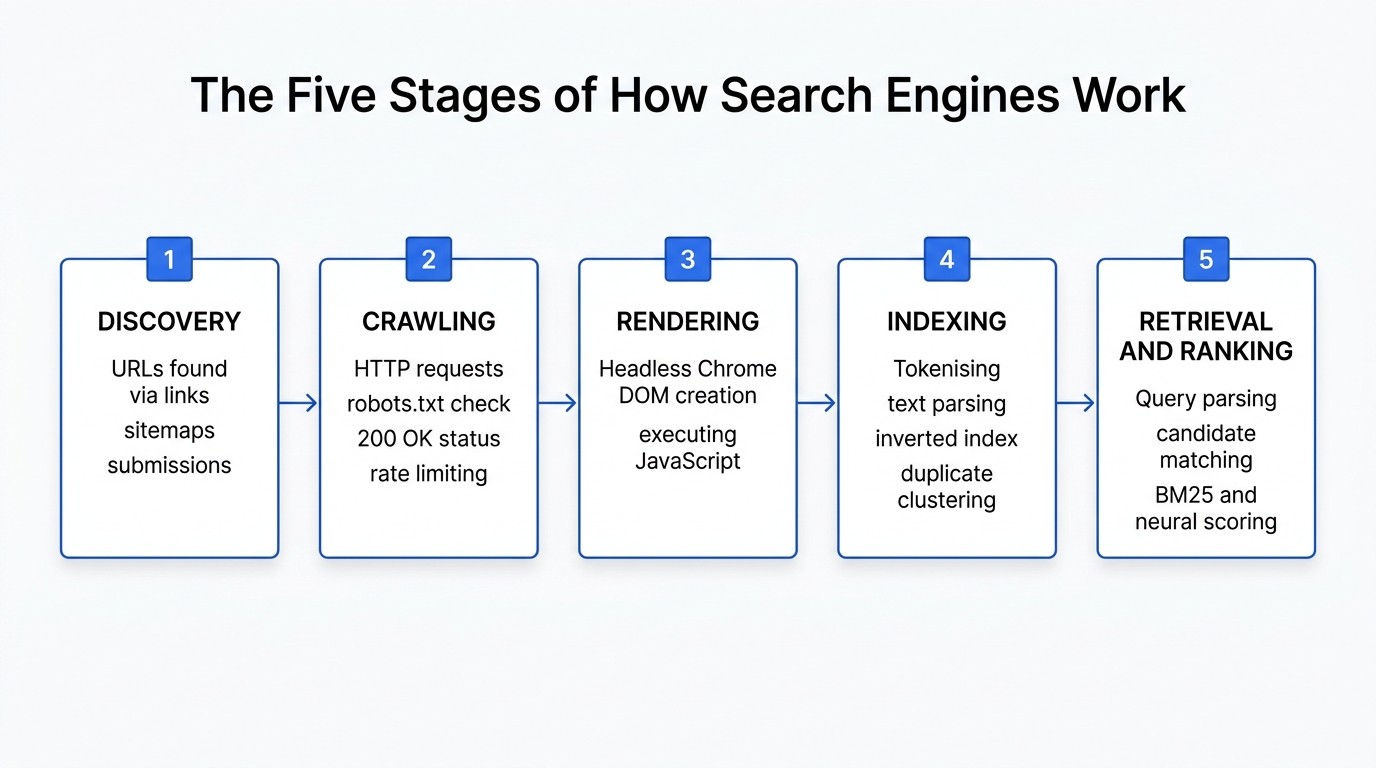
Search engines work as a pipeline, and each stage consumes the output of the one before it. That ordering is the single most useful diagnostic tool in the whole field.
1. Discovery
Before anything can be fetched, the URL has to be known. URLs enter a search engine's queue in a small number of ways: a link on a page that has already been crawled, an entry in an XML sitemap, a direct submission through a tool such as URL Inspection or the IndexNow protocol, or a redirect and canonical target. The most common way a search engine discovers a web page is still the first one — an ordinary link from a page it already knows about.
A page with none of these is not penalised. It is unknown, which is a different problem with a different fix. This is why an orphaned page can sit on a live server for years and never appear in any index.
2. Crawling
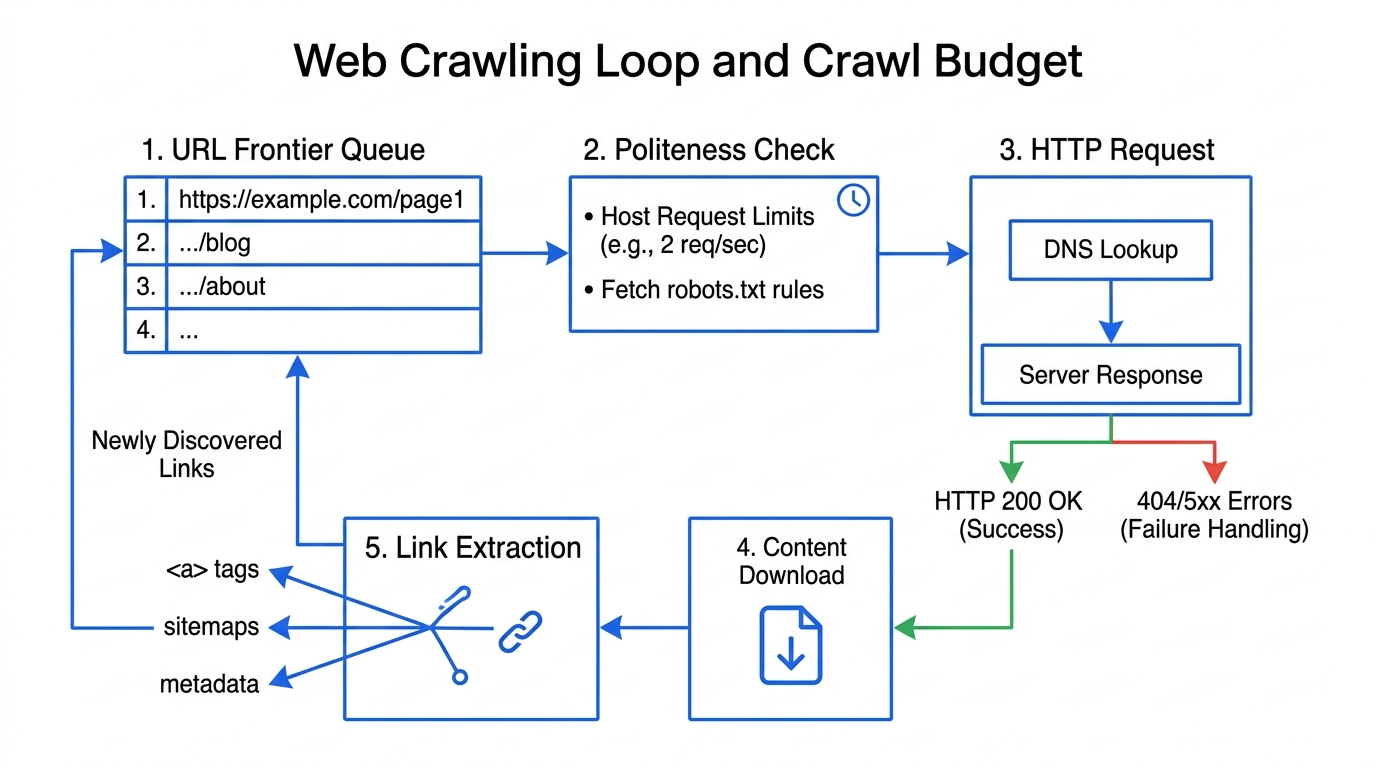
A crawler takes a URL from the queue, checks the host's robots.txt to see whether it is permitted to fetch it, sends an HTTP request, and records the response. Search engine crawling is deliberately unglamorous work: the status code decides everything downstream. Only a 200 passes content to the next stage. Redirects queue a new target, 404s discard, and sustained 5xx errors cause the crawler to slow down across the whole site.
Crawlers also limit their own request rate per host, because a crawler without politeness limits is indistinguishable from an attack. This self-imposed ceiling is what people mean by crawl budget. It matters on large sites and is almost irrelevant on small ones. For an in-depth breakdown of crawler loops and user-agents, see our dedicated article on what is a web crawler and how it works and why robots.txt does not remove a page from Google.
3. Rendering
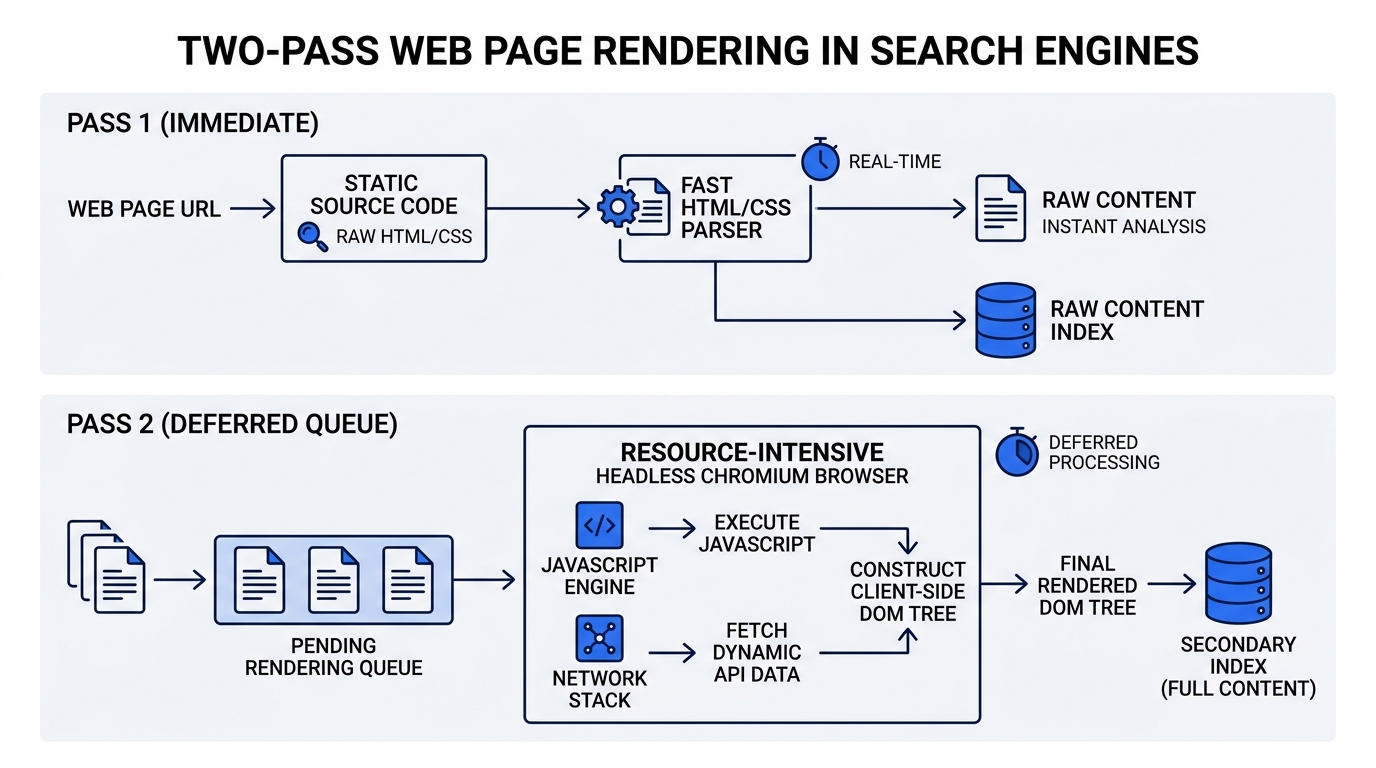
Raw HTML is parsed into a document tree. Where a page builds its content with JavaScript, the engine has to run that JavaScript in a headless browser to see the final text — far more expensive than parsing HTML, and therefore queued separately and processed later.
Content that exists only after scripts run is discovered later than content in the source, and not at all if the render times out or a required file is blocked in robots.txt. Fetching your own page with JavaScript disabled is the fastest way to see what the first pass gets.
4. Indexing
The text is broken into tokens, normalised, and written into an inverted index that maps each term to the pages containing it. Alongside the term data, the engine stores what ranking will need: the canonical URL chosen for this duplicate cluster, the language, any structured data, and quality signals accumulated over time.
Search engine indexing is selective, and this is the part people miss. A page can be fetched cleanly and still be discarded — as a near-duplicate, as thin content, or because it carries a noindex directive the crawler was allowed to read. The indexed web is considerably smaller than the crawled web, and the crawled web is smaller than the web. Learn the root causes in our deep-dive on why pages are crawled but not indexed.
5. Retrieval and ranking
A query arrives, is parsed, corrected and expanded, and is matched against the index. Retrieval is the cheap part: intersecting posting lists reduces billions of documents to thousands in milliseconds. Scoring is where judgement lives, weighing what the query means, how relevant and how good the content is, what links to it, how fresh it needs to be, and the searcher's context.
The weights are private, and they are not one fixed set — the same signal carries different weight for different queries.
| Stage | Question it answers | What failure looks like | Where to check |
|---|---|---|---|
| Discovery | Does the engine know this URL exists? | Page never appears anywhere, no error reported | Sitemaps report; internal link audit |
| Crawling | Was it allowed to fetch, and did it get a 200? | "Blocked by robots.txt", "Not found (404)", server errors | robots.txt; Crawl Stats; server access logs |
| Rendering | Does the content exist after JavaScript runs? | Indexed page with almost no content in it | URL Inspection rendered HTML; JS disabled |
| Indexing | Was it worth storing? | "Crawled – currently not indexed", "Duplicate", "Excluded by noindex" | Page Indexing report, by reason |
| Ranking | Did it score high enough to be shown? | Indexed and findable by exact title, invisible for the target query | Search Console Performance: impressions vs position |
What actually happens inside the index
The index is not a filing cabinet. The inverted index data structure explains almost everything about how search behaves.
Most explanations of search stop at "the page is added to the index", as though the index were a filing cabinet. It is worth being concrete, because the shape of the data structure explains almost everything about how search behaves.
A naive approach would store, for each document, the list of words it contains. That is a forward index, and answering a query with it means reading every document — impossible at web scale. The inverted index stores the opposite relationship: for each term, the list of documents containing it.
Take three very short documents:
- D1 the crawler fetches pages
- D2 the index stores pages
- D3 the crawler follows links
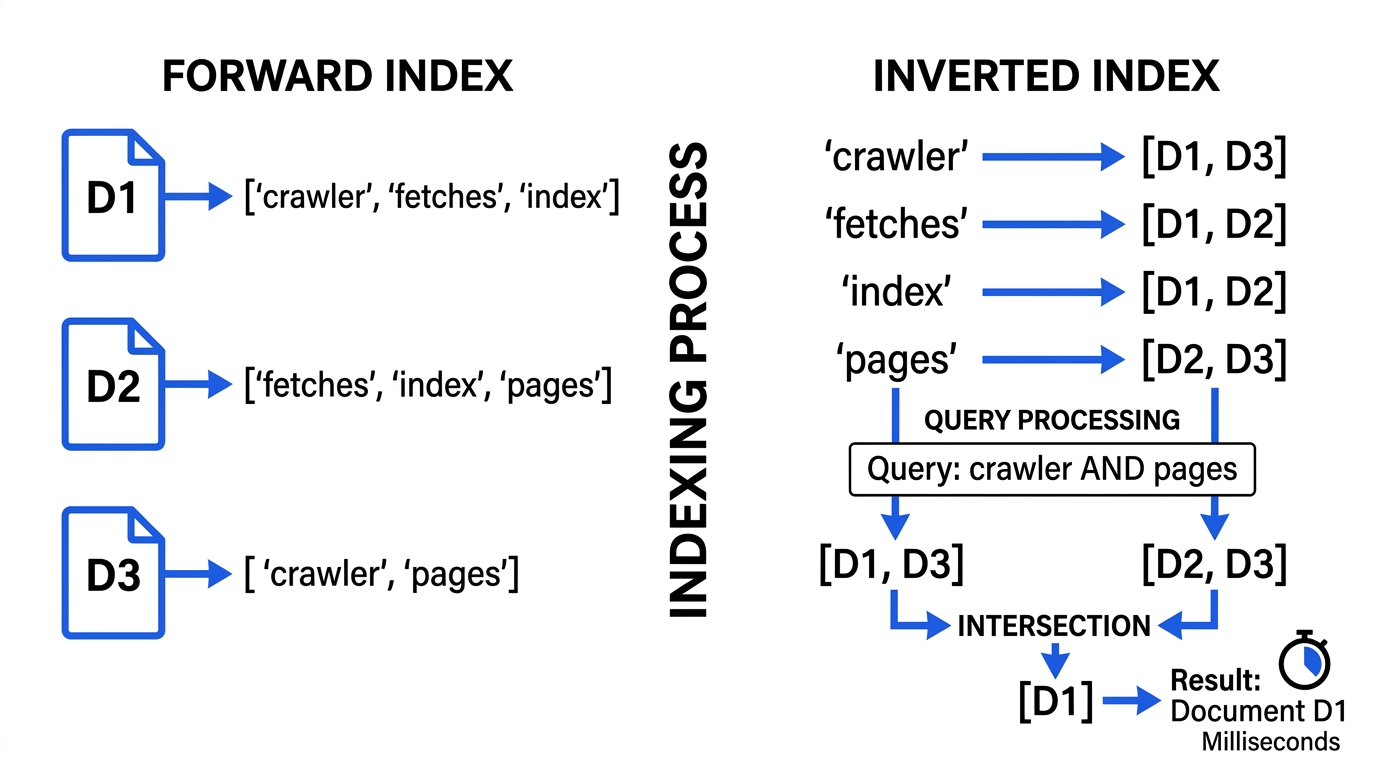
Tokenised and inverted, with the very common word the kept in so you can see why it ends up carrying no weight, the index looks like this. The posting list is simply the set of documents in which the term appears.
| Term | Posting list | Documents |
|---|---|---|
| crawler | D1, D3 | 2 |
| fetches | D1 | 1 |
| follows | D3 | 1 |
| index | D2 | 1 |
| links | D3 | 1 |
| pages | D1, D2 | 2 |
| stores | D2 | 1 |
| the | D1, D2, D3 | 3 |
A search for crawler pages is now an intersection: read the posting list for crawler, read the posting list for pages, and keep what appears in both. The answer is D1, and no document was ever opened. Two short list reads replaced a full scan of the collection. That is the entire reason search is fast, and it has not fundamentally changed since the 1960s.
Notice what happened to the: it appears in every document, so knowing that a document contains it tells you nothing. That observation becomes inverse document frequency, which becomes TF-IDF and then BM25, the scoring functions that sit underneath lexical ranking to this day.
Real indexes store more in each posting than a document ID — the position of each occurrence, so phrase queries can be answered, and per-term weights used during scoring. They are also compressed and split into segments, because a single in-memory dictionary stops being practical long before web scale. But the idea in the table above is the whole idea.
Search engine algorithms: how ranking decides the order
Retrieval has narrowed billions of documents to a candidate set. Scoring puts that set in order across several layers of ranking algorithms, cheapest first.
Retrieval has narrowed billions of documents to a candidate set. Scoring puts that set in order. People talk about "the algorithm" as though it were one thing; in practice a modern engine layers several families of ranking algorithms on top of each other, cheapest first.
Lexical scoring: TF-IDF and BM25
The oldest layer asks a mechanical question: given the words in the query, how well does this document match them? Two ideas do most of the work. Term frequency says a document mentioning "crawler" eight times is probably more about crawlers than one mentioning it once. Inverse document frequency says that a term appearing in almost every document is worthless for telling documents apart. Multiply the two and you have TF-IDF.
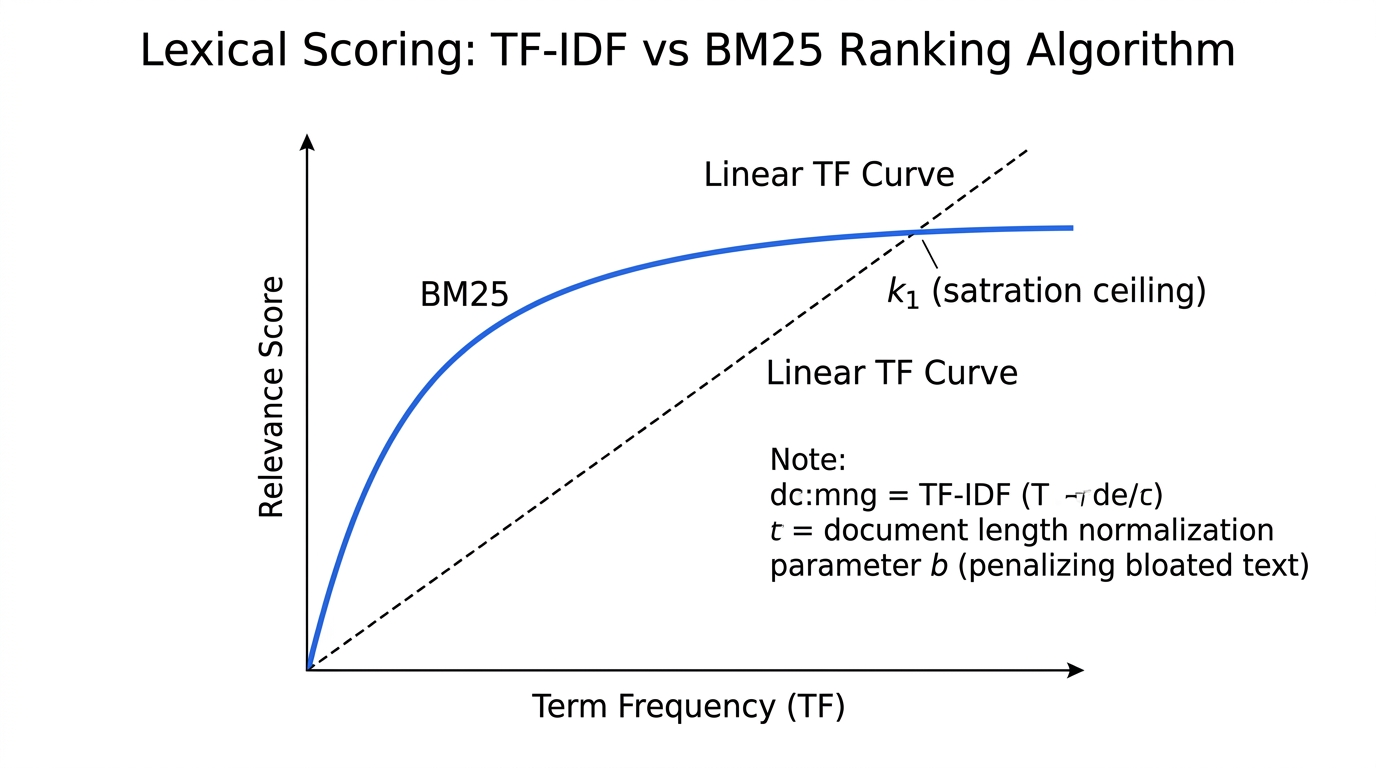
BM25 is the refinement that has stayed the practical default for four decades, because it fixes two things TF-IDF gets wrong: term frequency should saturate (the fortieth mention adds almost nothing over the fourth), and long documents should not win by length alone. The BM25 ranking function is:
score(D, Q) = Σ IDF(qᵢ) * W(qᵢ, D)
W(qᵢ, D) = [ f(qᵢ, D) * (k₁ + 1) ] / [ f(qᵢ, D) + k₁ * (1 − b + b * |D| / avgdl) ]
IDF(qᵢ) = ln( (N − n(qᵢ) + 0.5) / (n(qᵢ) + 0.5) + 1 )
Where f(qᵢ, D) is how often term qᵢ appears in document D,|D| is the document length in words, avgdl is the average document length in the collection, N is the number of documents and n(qᵢ) is how many of them contain qᵢ. The two free parameters are k₁, which controls how quickly term frequency saturates and is normally set between 1.2 and 2.0, and b, which controls how hard long documents are penalised and is normally 0.75.
BM25 is not what ranks Google's results. It is what ranks the first cheap pass in most retrieval systems, including the open-source ones — Lucene, Elasticsearch, OpenSearch and Solr all use it as their default similarity. Knowing it tells you what the floor of relevance scoring looks like.
Link-based scoring: PageRank and what replaced it
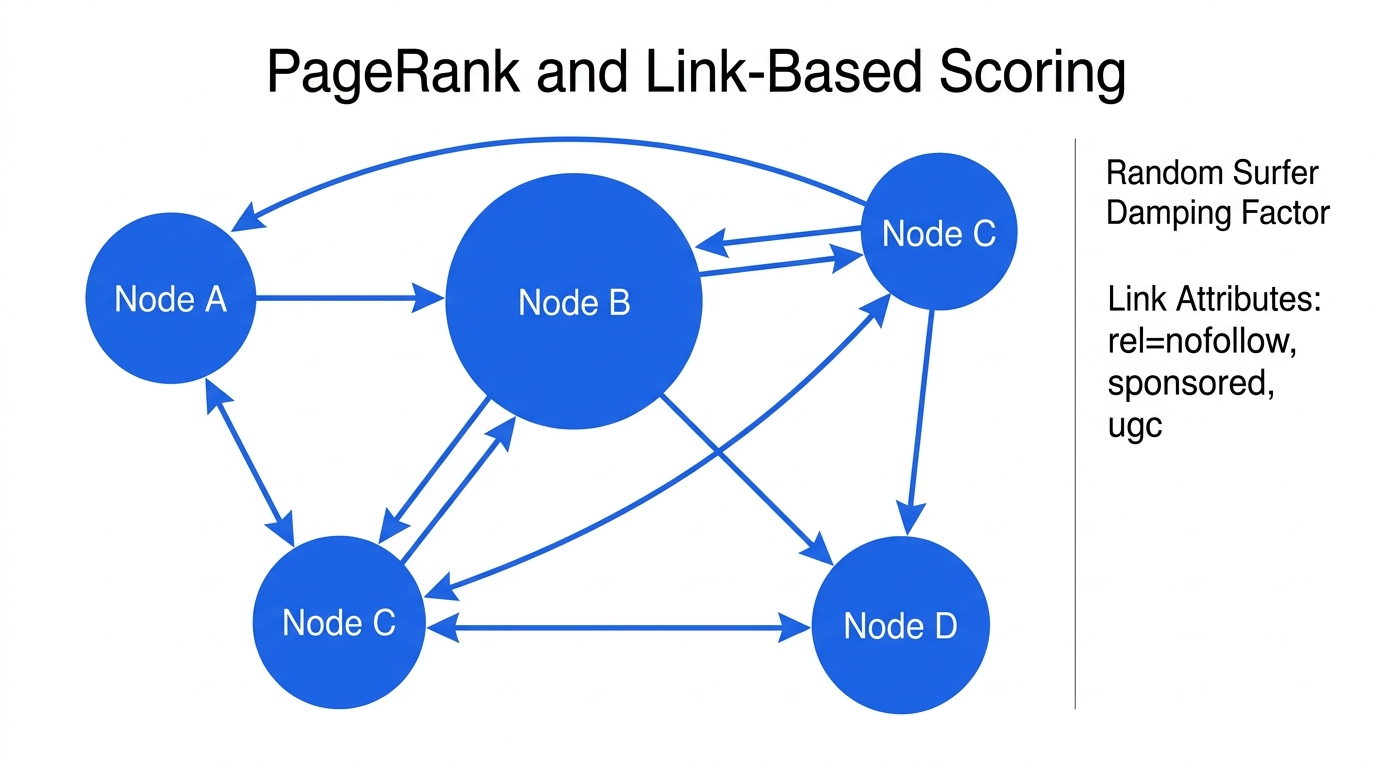
The original insight that separated web search from library search was that the link graph carries information the text does not. PageRank modelled a random surfer clicking links forever and asked where that surfer would spend their time; a page linked from many pages is probably important, and a link from an important page counts for more.
What has changed since is the filtering on top. Paid, exchanged and mass-placed links are discounted, and rel="sponsored", rel="ugc"and rel="nofollow" exist so publishers can declare a link's nature. Link signals still matter; the naive version of them has not survived twenty-five years of people trying to manufacture it.
Learned ranking and semantic matching
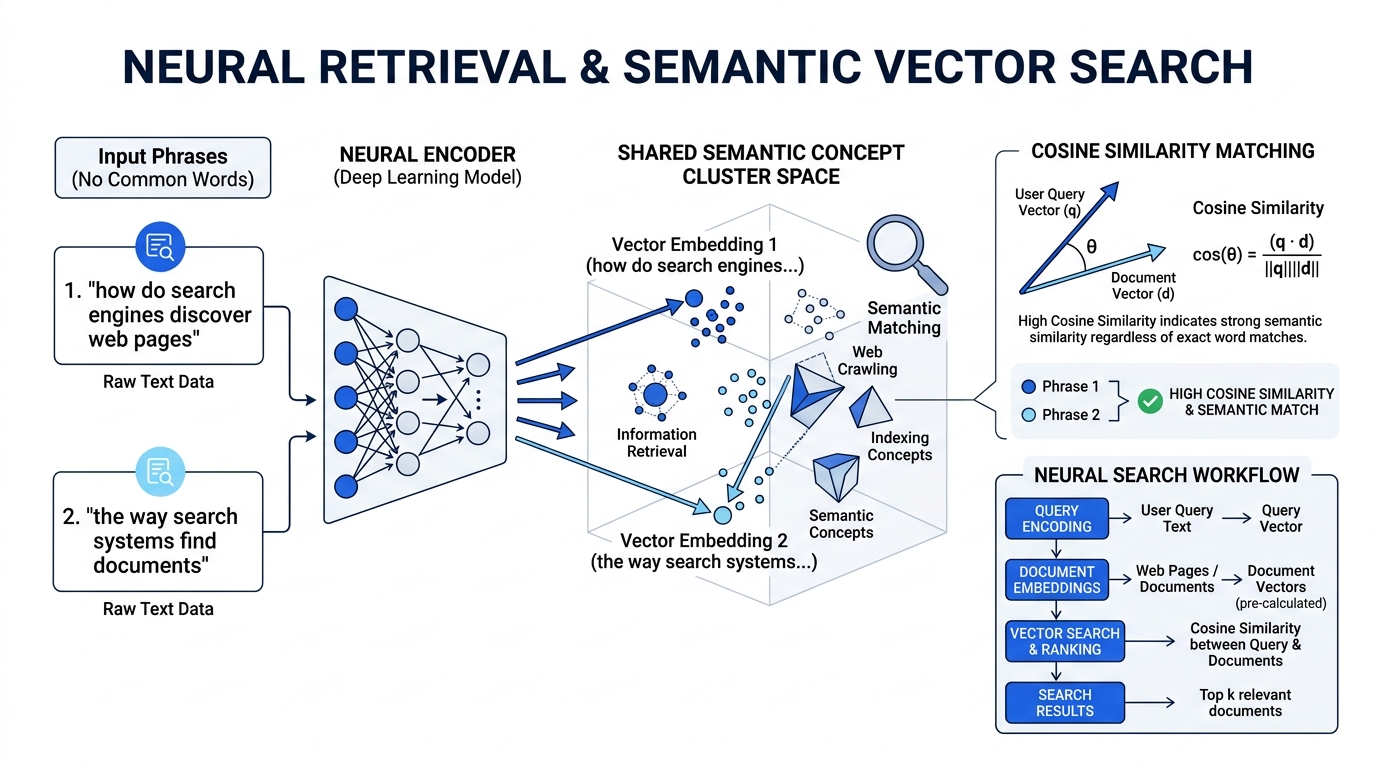
Above the lexical and link layers sits machine-learned ranking: models trained on enormous quantities of interaction and evaluation data, which take hundreds of features and produce a final ordering. Alongside them, neural retrieval represents queries and documents as vectors so that a page about "how do search engines find results" can match a query about "the way a search engine discovers pages" without sharing a single distinctive word.
This is what makes exact-phrase optimisation obsolete as a tactic. The system is no longer matching your string; it is matching the concept your page is about against the concept the query is about.
The families of signals, in Google's own framing
- Meaning of the query — language, intent, whether freshness matters for this kind of question at all. The query is often rewritten before it reaches the index: corrected, expanded with terms the engine has learned are equivalent, sometimes decomposed into several related searches.
- Relevance of content — whether the page contains the concepts the query is about, in a way that answers it rather than mentioning it.
- Quality of content — whether it demonstrates first-hand knowledge, whether it is the kind of source others rely on, whether it is accurate. Estimated from many signals rather than measured directly.
- Usability — whether the page loads, works on the device in use, and is served over HTTPS. Real, and far smaller than the attention it receives.
- Context and settings — location, language, device, and search history where it is available.
The part that is not knowable
The exact weighting is private, and — this matters more — there is no single set of weights to know. The same signal carries different weight for different queries. Freshness dominates "election results" and is nearly meaningless for "what is an inverted index". Any claim that a factor is worth a specific percentage is asserting something that does not exist in that form.
What is a SERP? The anatomy of a search engine results page
SERP stands for search engine results page. The phrase 'ten blue links' describes a layout that has not existed for over a decade.
SERP stands for search engine results page: the page a search engine returns after you submit a query. The acronym gets used loosely — "SERPs" for the results generally, "SERP ranking" for where a page sits on it, "SERP analysis" for the work of studying one — but the underlying definition is that plain.
What has changed is what a SERP contains. The phrase "ten blue links" describes a page that has not existed for over a decade. A single results page today can carry paid ads, an AI-generated answer, a featured snippet, a local pack with a map, a knowledge panel, image and video carousels, a people-also-ask block, and — somewhere among all that — the organic results. Understanding the anatomy of a SERP is more useful than any single number about position, because position means something different depending on what else is on the page.
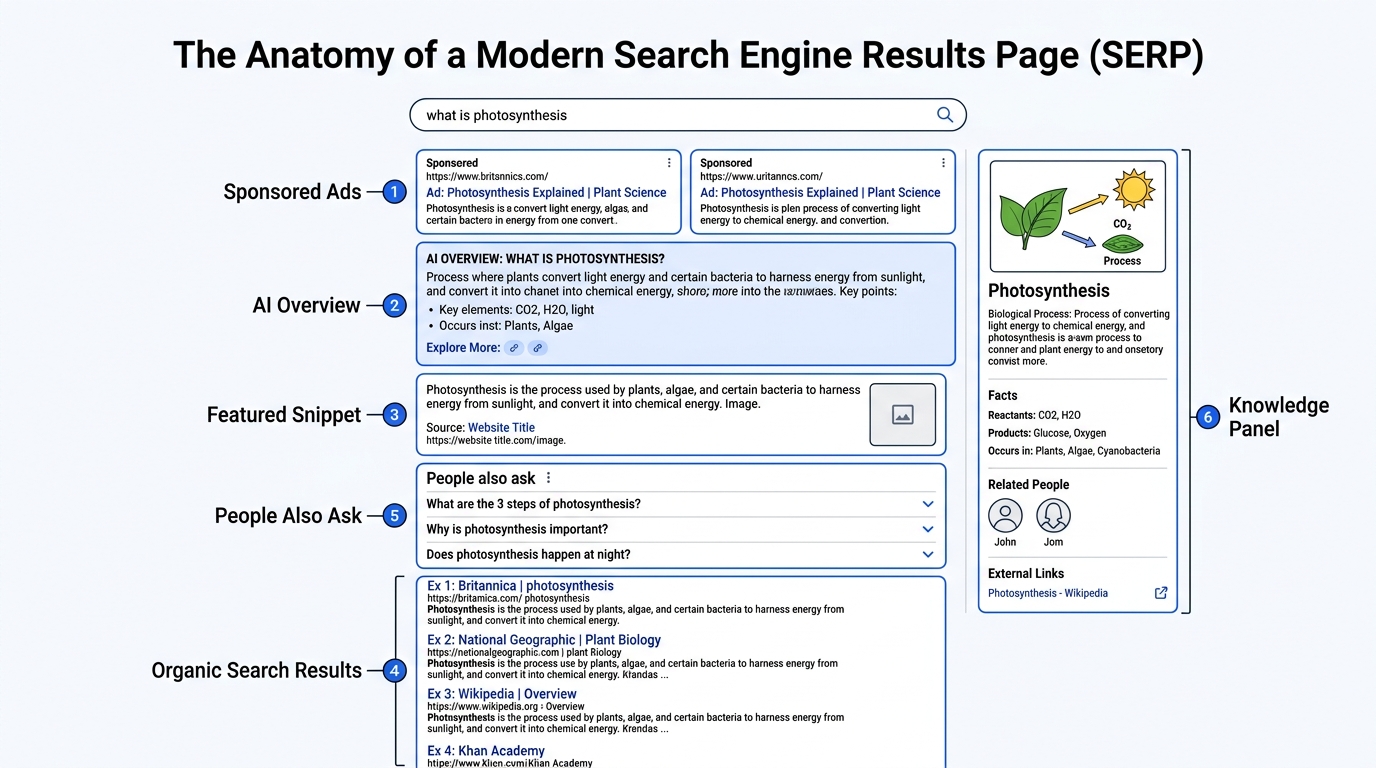
| SERP feature | What it is | Can you influence it? |
|---|---|---|
| Paid ads | Sponsored listings sold by auction, labelled as ads, usually above and below organic | Only by buying them — no organic route in |
| AI-generated answer | A written summary above the results, with links to the pages it drew on | Indirectly — be indexed, be extractable, be citable |
| Featured snippet | An organic result promoted into a box with an extracted answer | Yes — answer the question directly, in a self-contained block |
| Organic results | The ranked list of ordinary organic links, unpaid | Yes — this is what SEO is about |
| People also ask | Expandable related questions, each with an extracted answer | Yes, by the same mechanism as snippets |
| Local pack | A map with three nearby business listings | Yes — through a business profile, not the website alone |
| Knowledge panel | An entity summary drawn from the knowledge graph | Partly — entity clarity and authoritative sources about you |
| Image / video packs | Carousels of images or videos matched to the query | Yes — image and video optimisation, structured data |
| Sitelinks | Sub-page links shown under a result, chosen algorithmically | Indirectly — clear site structure and navigation |
SERP ranking, and what the number actually means
SERP ranking means the position your page occupies in the organic results for a given query. Position 1 is the first organic result — not the first thing on the page, which may well be four ads, an AI answer and a video carousel above it. This gap between "ranked first" and "seen first" is the reason position alone is a poor health metric, and why click-through rate at a given position varies so wildly between query types.
Ranking is also not a single fact about a page. It is a fact about a page, a query, a location, a language, a device and a moment. The same URL can sit at position 3 for one user and position 11 for another, on the same day, with nothing having changed.
SERP analysis: what it means and how to do it
SERP analysis is the practice of reading a results page as evidence about what the engine believes the query means, before you write anything. It is the highest-leverage twenty minutes in content work, and it costs nothing. Search your target query and record:
- What page types rank — guides, product pages, comparisons, forums, videos. If nine of ten results are product pages, the engine has decided this query is transactional, and your guide will not rank no matter how good it is.
- Which SERP features are present. A featured snippet tells you the answer format that wins. A local pack tells you the query has been read as local. An AI answer tells you the question is answerable in a paragraph.
- How deep the results go before drifting off-topic. A shallow, drifting SERP is one the engine is not confident about — which is an opportunity.
- What the top results all contain that you would not have thought to include. That set is the engine's own summary of what the query expects.
One caution on tooling: "SERP API" in a vendor's pricing page means a paid service that scrapes results and returns them as structured data. It is not something search engines publish. Rank numbers from any such tool are a sample, not a measurement.
The search engines themselves: who actually has an index
There are hundreds of search engines online and remarkably few indexes. Most names are front-end interfaces sitting on top of somebody else's crawl.
There are hundreds of search engines online and remarkably few indexes. Most of the names people list are interfaces sitting on top of somebody else's crawl — which is why the practical question is never "how do I rank on DuckDuckGo" but "whose index is DuckDuckGo reading from".
| Search engine | Index | Notes |
|---|---|---|
| Its own | The dominant index in most of the world; publishes the most documentation about how it works | |
| Bing (Microsoft) | Its own | The second major Western index, and the one several other engines license |
| Yandex | Its own | Dominant in Russia; its own crawler, YandexBot |
| Baidu | Its own | Dominant in mainland China; Baiduspider |
| Brave Search | Its own | Independent index built from its own crawl |
| Mojeek | Its own | Small independent UK crawler and index |
| Naver / Seznam / Sogou | Their own | National engines for South Korea, Czechia and China respectively |
| DuckDuckGo | Mostly licensed | Primarily Bing results plus its own crawler for some sources |
| Yahoo Search | Licensed | Bing-powered; the old Yahoo Directory was a different product entirely |
| Ecosia, Startpage, Qwant | Licensed / hybrid | Privacy or cause-led front ends over Google and/or Bing results |
| Perplexity, ChatGPT search, You.com | Retrieval layer | Answer engines that retrieve from an index rather than owning a full web crawl |
Index arrangements change — licensing deals end and independent indexes get built. Verify the current picture before you make a decision that depends on it.
For a list of search engines by name, the ones you will encounter in practice are:Google, Bing, Yahoo, DuckDuckGo, Brave Search, Ecosia, Startpage, Qwant, Mojeek, Marginalia, Kagi, Baidu, Yandex, Naver, Seznam, Sogou, Ask.com, Searx/SearXNG, Perplexity and You.com. Twenty names, six or seven indexes. That ratio is the point.
Why search engines are important
The web has no table of contents. It is a few hundred million active sites with no shared catalogue, no editor and no shelving system, and the only reason it is usable at all is that a handful of organisations have taken on the job of reading it and telling you where things are. Strip the search engines out and the web reverts to what it was in 1993: useful if you already know the address, and otherwise a very large room with the lights off.
For anyone publishing, the importance is more concrete. Search is the one distribution channel that does not depend on an existing audience, a paid budget or an algorithmically fickle feed. Someone with a problem describes it in their own words, and a system that has never heard of you decides whether your page is the best answer. That is an unusually fair deal, and it is the entire reason search engine optimization exists as a discipline.
AI search: what changed and what did not
Nearly every AI search feature in production is a retrieval-augmented generation system. AI-supported responses are a new surface on old plumbing.
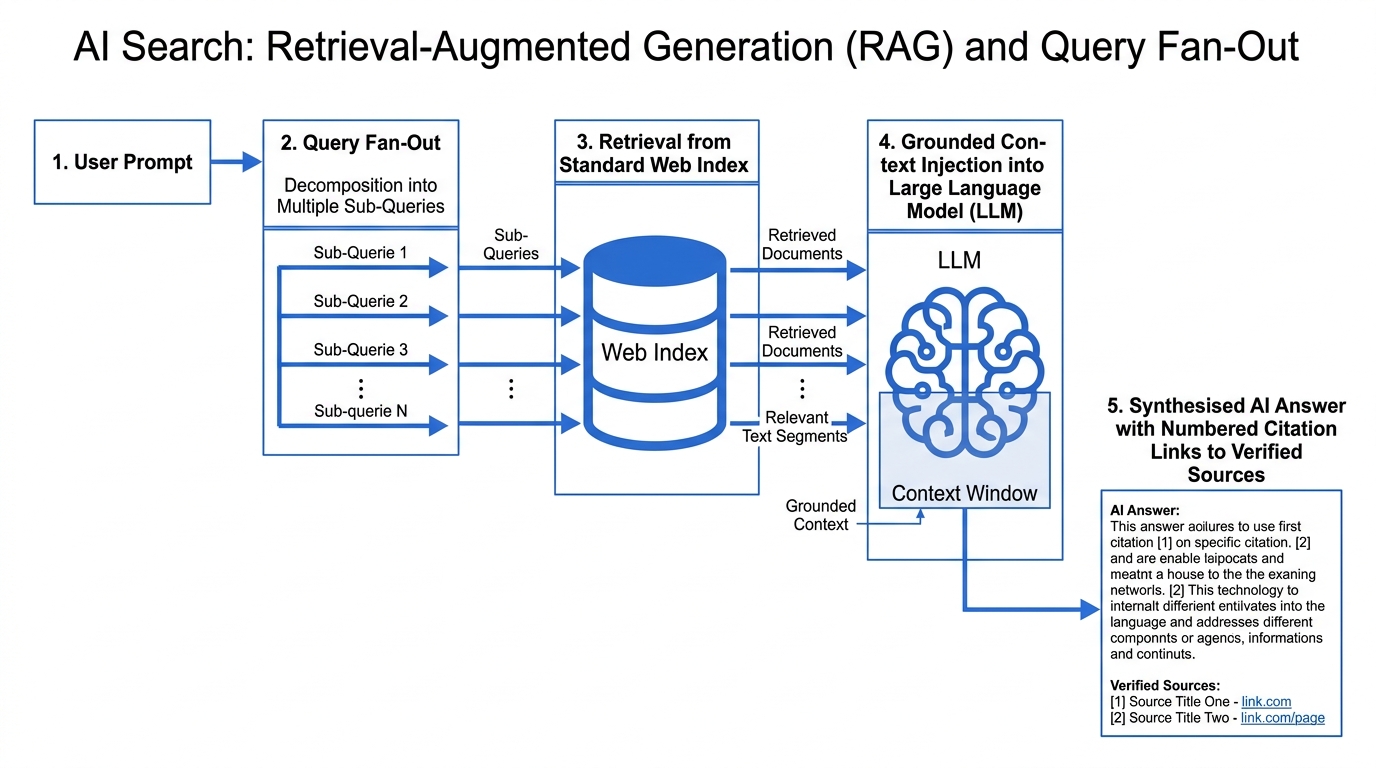
Nearly every AI search feature in production is a retrieval-augmented generation system. The pattern is consistent: take the question, retrieve relevant documents from an index, hand those documents to a language model as context, and have the model write an answer grounded in them.
That single fact settles most of the anxiety around the subject. The retrieval step is an ordinary search engine doing its ordinary job. Crawling, indexing and ranking still decide what the model is permitted to see. A page that is not indexed cannot be retrieved, and a page that cannot be retrieved cannot be summarised or cited. AI-supported responses are a new surface on old plumbing.
AI Overviews and AI Mode
An AI Overview is a generated summary above the results with links to the pages it drew on. AI Mode is a conversational interface where follow-up questions retain the context of earlier ones. Google has described AI Mode as using a query fan-out technique: the question is broken into multiple related searches across subtopics, and the results are synthesised into one answer.
For anyone writing content, the practical consequence of fan-out is that the query being run is often not the query you targeted. Pages that answer the underlying question completely match more of the rewritten variations than pages optimised for one exact string.
What appears to matter
Content that gets extracted shares properties, and none of them are new. The answer comes first, in a self-contained block, before the context and the caveats. Claims are specific enough to be quoted rather than hedged into uselessness. The structure is genuine — real headings, real lists, real tables — so a passage survives being lifted out of the page. The source of each factual claim is named. This is the same advice that made content extractable for featured snippets, applied to a system that extracts far more often.
Two claims to be sceptical of
- There is no AI-specific structured data. No schema.org type marks content for AI systems, and invented properties do nothing.
- Google has stated that it does not use llms.txt. The file is harmless and costs nothing to publish, but it is not a mechanism for influencing Google's AI features and should not be sold as one.
How to rank higher in Google: the basics that actually apply
The honest list of what moves rankings is much smaller than the industry's output would suggest. Here it is in rough order of how often it is the actual bottleneck.
Everything above is descriptive. This section is the short prescriptive part, and it is short deliberately — the honest list of what moves rankings is much smaller than the industry's output would suggest. In rough order of how often it is the actual bottleneck:
1. Be technically reachable
Return 200. Be linked from somewhere. Be absent from every Disallow line that matters. Have your content present without JavaScript, or accept a slower path into the index. Nothing else on this list can help a page the crawler cannot fetch. See our guide on HTTP status codes for SEO.
2. Match the intent the SERP shows you
If the results are all comparison tables and you wrote an essay, the essay loses. Read the SERP before writing, not after publishing. This is the most common cause of a good page that will not rank, and no amount of on-page SEO fixes a page-type mismatch.
3. Answer the question completely, and first
Put the direct answer in the opening paragraph and in the first line under each heading. Cover the subtopics the query implies, not just the phrase itself. This helps ordinary ranking, featured snippets and AI extraction simultaneously, because all three are looking for the same thing: a self-contained passage that resolves the question.
4. Get the on-page mechanics right once
- One H1 per page, headings that describe sections rather than tease them, no skipped levels.
- A title tag that states what the page is; a meta description that earns the click but does not affect ranking.
- Descriptive URLs, self-referencing canonical tags, alt text that describes the image.
- Internal links with anchor text that says what is at the other end.
5. Earn references
Off-page SEO in one sentence: publish something specific enough that people have a reason to cite it. Original data, a genuinely clearer explanation, a tool that saves someone an hour. Link building that starts from "how do we get links" rather than "what would be worth linking to" is a treadmill.
6. Then, and only then, page experience
Core Web Vitals, mobile responsiveness, HTTPS. Real factors, small ones, and the last place to look when a page is not ranking. A slow page with the right answer outranks a fast page with the wrong one every time.
How to build a small search engine yourself
A working toy search engine is four components and roughly a hundred lines of code. Understanding it makes every debate about algorithms easier to evaluate.
The fastest way to stop finding search mysterious is to build a tiny one. A working toy search engine is four components and roughly a hundred lines. Understanding it makes every debate about "the algorithm" easier to evaluate.
| Step | What you build | What it teaches |
|---|---|---|
| 1. Crawler | A loop with a URL queue and a seen-set. Fetch, parse the HTML for links, push new ones, respect robots.txt, sleep between requests. | Why discovery is a separate problem from fetching, and why politeness limits exist |
| 2. Parser | Strip tags, extract the visible text and the title, lowercase, split on non-letters, drop stop words, optionally stem. | Why what you see rendered and what gets indexed are not the same string |
| 3. Index | A dictionary mapping each token to the list of document IDs (and positions) containing it. | Why an intersection of two short lists beats a scan of a million documents |
| 4. Ranker | Score the intersection with TF-IDF or BM25 and sort descending. | Why term frequency has to saturate and length has to be normalised |
| 5. Interface | A search box, a results template, and a snippet extracted around the matched terms. | Why the results page is a design problem as much as a retrieval one |
Two things become obvious once it runs. First, the mechanical part — crawl, tokenise, invert, score — is genuinely straightforward, and every production system still has these exact four pieces inside it. Second, everything hard is what you did not build: deciding which of a million equally relevant pages is any good, handling misspellings and synonyms and intent, resisting people who want to manipulate you, and doing all of it in under 200 milliseconds. The distance between a toy and Google is not in the pipeline. It is in judgement and scale.
If you only want a search box on your own site rather than a search engine, do not build any of this. Use a hosted site-search product or the search built into your CMS. Crawling the open web is a different project from searching one site you already own.
Four controls people confuse
Almost every technical search problem is one of these four being expected to do another's job. Each controls exactly one thing.
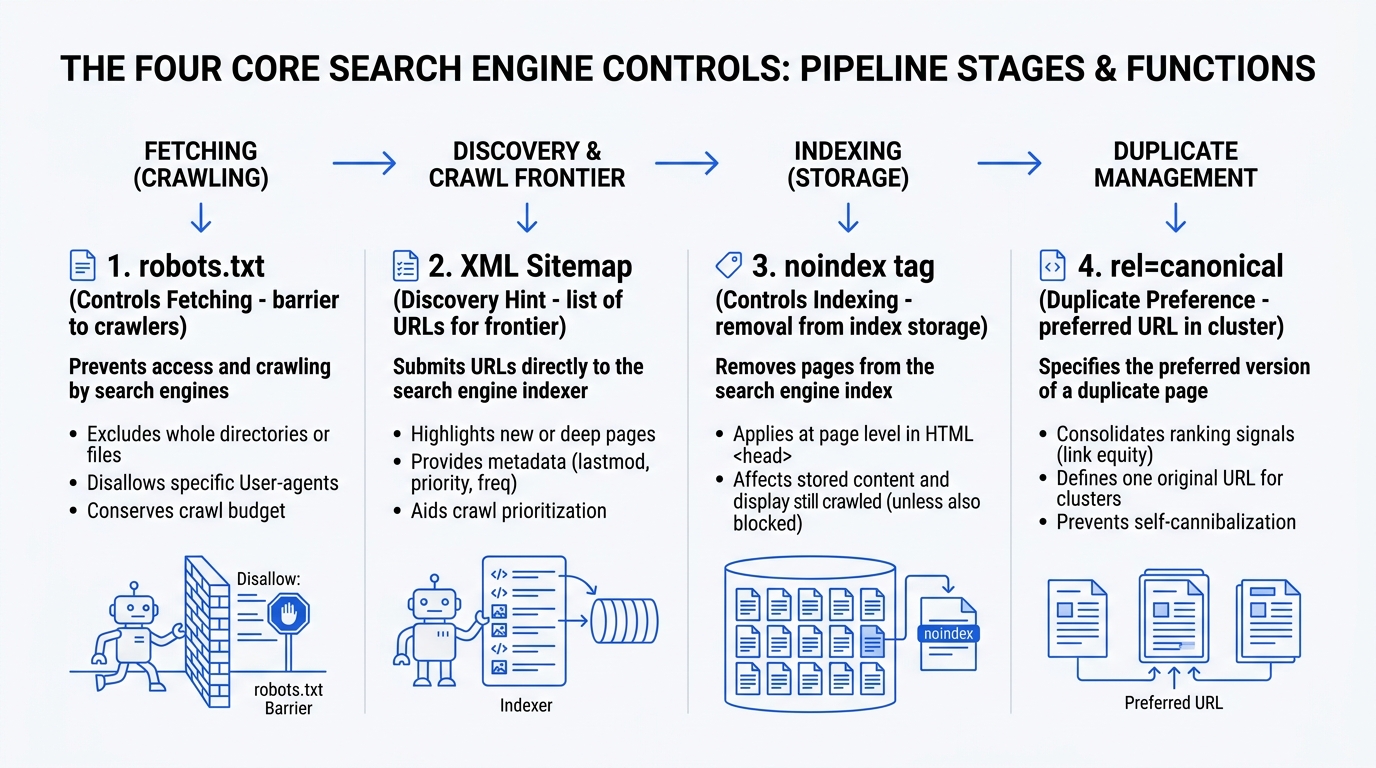
| Control | What it is for | What it does not do | Common mistake | How to verify it worked |
|---|---|---|---|---|
| robots.txt | Tells crawlers which paths they may fetch | Does not remove a URL from the index | Blocking a URL and adding noindex to it, so the directive is never read | robots.txt Tester and the Crawl Stats report; server logs show whether the fetch stopped |
| XML sitemap | Hints which URLs exist and when they changed | Does not force a crawl, an index, or a ranking | Listing redirects, 404s or noindex URLs, which contradicts your other signals | Sitemaps report: URLs discovered versus indexed |
| noindex | Removes a page from the index | Does not stop the page being fetched, and does nothing if the fetch is blocked | Applying it to a robots-disallowed URL, or leaving a staging directive in production | URL Inspection: the live test reports the directive it found |
| rel=canonical | States which URL of a duplicate set you prefer | Does not redirect, and does not bind the engine to your choice | Contradicting it with internal links, sitemap entries or redirects | URL Inspection reports both your declared canonical and Google's selected one |
The pattern worth memorising: robots.txt controls fetching, noindex controls indexing, a sitemap is a hint, and a canonical is a preference. Two of the four are not instructions at all. Read our practical guides on why robots.txt does not remove a page and the technical foundations guide.
Check your own site in 15 minutes
Worked in this order, these fifteen steps locate which stage of the pipeline is failing before you spend anything on fixing the wrong one.
Fetch your homepage from the command line with a plain HTTP request and confirm it returns 200, not a redirect chain.
Open your robots.txt at /robots.txt and read every Disallow line. Confirm nothing you want indexed sits under one of them.
Confirm your XML sitemap loads, that its URLs all return 200, and that it is referenced from robots.txt with an absolute Sitemap: line.
In Google Search Console, open the Page Indexing report and read the excluded reasons rather than the total. The reason names the stage that failed.
Run URL Inspection on your most important page and read the rendered HTML, not the source. That is what the engine evaluated.
Load that same page with JavaScript disabled in your browser. Whatever remains is what the first indexing pass sees.
Search Google for site:yourdomain.com and compare the rough count against the number of pages you believe you publish.
Check that every page has exactly one H1 and that heading levels are not skipped. Both are trivial to fix and both affect extractability.
Check your canonical tags: each page should declare itself, absolutely, with a trailing slash matching your actual URLs.
Look for soft 404s — pages returning 200 with a 'not found' or empty-state message. Search Console reports these by name.
Crawl your own site with a desktop crawler and export every non-200 response. Compare that list against your sitemap.
Open your server access logs and filter for crawler user-agents. This is the only direct evidence of what was actually requested.
Verify that the crawler user-agents in those logs are genuine, using a reverse DNS lookup on the requesting IP.
Connect Bing Webmaster Tools as well. A second independent index is a second opinion on whether your pages are technically reachable.
Validate your structured data and confirm every claim in it appears on the visible page. Markup that contradicts the page is ignored or penalised.
Myths, with sources
Six claims that circulate constantly, what is actually true, and where to check.
Myth
Blocking a page in robots.txt removes it from Google.
robots.txt stops the fetch, not the listing. If other pages link to the blocked URL, it can still appear in results without a snippet. Removing a page from the index requires a noindex directive on a page the crawler is allowed to fetch.
Myth
Submitting a URL in an XML sitemap gets it indexed.
A sitemap is a discovery hint. It tells the engine a URL exists; it does not commit it to crawling the URL, and it certainly does not commit it to storing the page. Sitemap URLs that are duplicates, thin or blocked are still excluded.
Myth
Structured data is a ranking factor.
Structured data can make a page eligible for certain rich result types, which affects how it is displayed and therefore how often it is clicked. Google's own documentation is direct that it is not itself a ranking signal.
Myth
There is a fixed list of ranking factors with fixed weights.
Google describes families of signals rather than a formula, and states that their application is query-dependent. Freshness dominates for a news query and is nearly irrelevant for a stable definition. A single set of weights is not a thing that exists to be leaked.
Myth
Publishing an llms.txt file improves AI visibility.
Google has stated publicly that it does not use llms.txt. The file is harmless and a few tools read it, so publishing one costs nothing — but it is not a mechanism for influencing AI Overviews or AI Mode, and it should not be sold as one.
Myth
A crawler will find any page that exists on your server.
A crawler can only fetch URLs it has discovered, and discovery happens through links, sitemaps, submissions and redirect targets. A page with no inbound links, absent from the sitemap and never submitted is not penalised — it is unknown.
Frequently asked questions
Every answer is written as a self-contained explanation that resolves the question in its opening sentence.
What are the four parts of a search engine?
A crawler that discovers and fetches URLs, an indexer and index that store a processed copy of what was fetched, a query processor that interprets what the user asked and retrieves candidates, and a ranking algorithm that orders those candidates. The user-facing search box and results page are usually counted as a fifth, interface layer.
Is Google a search engine or a web browser?
Google is a search engine. Chrome is the web browser Google makes. They are separate products: the search engine finds the addresses, the browser fetches and displays what is at them.
What is the difference between a browser and a search engine?
A browser is software on your device that requests and renders one document you already have the address for. A search engine is a service that has crawled the web, keeps an index of it, and returns a ranked list of addresses in answer to a query. You use a browser to reach a search engine.
What does SERP stand for?
Search engine results page. It is the page returned after you submit a query, containing organic results plus whatever ads, snippets, packs, panels and generated answers the engine has decided the query warrants.
What is SERP ranking?
The position a page occupies in the organic results for a specific query. It is not a fixed property of a page — the same URL can rank differently by location, language, device and moment.
What is SERP analysis?
Reading a results page as evidence about what the engine believes a query means, before writing for it. You record which page types rank, which SERP features appear, and what every top result contains, and use that as the specification for your own page.
How do search engines work, in one paragraph?
They discover URLs through links, sitemaps and submissions; fetch them if robots.txt permits; render the page to see what JavaScript produces; tokenise the text into an inverted index that maps terms to documents; then, when a query arrives, intersect posting lists to find candidates and score those candidates on relevance, quality, links, freshness and context.
What is a search engine algorithm?
The scoring system that orders retrieved candidates. In practice it is several layers: lexical scoring such as BM25, link-based signals descended from PageRank, and machine-learned models that combine hundreds of features. The weights are private and vary by query type.
How does a search engine find results so fast?
It never reads the documents at query time. The inverted index maps each term to a list of the documents containing it, so answering a two-word query is an intersection of two short lists rather than a scan of billions of pages.
Why are search engines important?
The web has no shared catalogue. Search engines are the only reason a page written by a stranger can be found by someone who did not know it existed, which makes search the one distribution channel that does not require an existing audience or a budget.
How do I rank higher on Google?
Be technically reachable, match the page type the SERP already rewards for that query, answer the question completely and in the opening lines, get the on-page mechanics right once, and publish something specific enough to be worth citing. Page experience matters last, not first.
How many search engines are there?
Hundreds of interfaces and roughly six or seven significant independent indexes. Most named search engines license their results from Google or Bing, which is why the practical question is whose index a given engine reads from.
Start here: the learning path
Each guide below is a full explanation of its topic, with the supporting articles underneath it. Read them in this order and the pipeline assembles itself.
| Guide | Covers | Explore |
|---|---|---|
| What a search engine is | The definition, the four components, and how the pieces fit together | Open guide |
| Crawling | How crawlers find URLs, what they fetch, and what stops them | Open guide |
| Indexing | Parsing, rendering, canonicalisation, and the inverted index | Open guide |
| Ranking | Signal families, lexical scoring, links, and why weights are query-dependent | Open guide |
| Queries | Correction, expansion, intent classification and fan-out | Open guide |
| The search engines | Which engines own an index and which license one | Open guide |
| Technical foundations | robots.txt, sitemaps, noindex, canonicals and their failure modes | Open guide |
| SEO | What actually moves rankings, in order of how often it is the bottleneck | Open guide |
| AI search | Retrieval-augmented generation, fan-out and citation behaviour | Open guide |
| Glossary | Twenty-one terms defined precisely, each with its own page | Open guide |
| Free tools | Four tools that prove something specific about your own site | Open guide |
Start here: the learning path
Thirteen guides, in the order they make most sense to read. Each one is a full explanation of its topic with the articles for that topic underneath it.
What a search engine is
The definition, the parts, and how the pieces fit together.
Guide published, articles in progressCrawling
How crawlers find URLs, what they fetch, and what stops them.
2 articlesIndexing
Parsing, rendering, canonicalisation, and the inverted index.
1 articleRanking
Retrieval, scoring signals, and why order changes by query.
Guide published, articles in progressQueries
Intent, query parsing, synonyms, and how a query is rewritten.
Guide published, articles in progressThe results page
Result types, features, and what each block is actually built from.
Guide published, articles in progressAI search
AI Overviews, AI Mode, retrieval-augmented generation, fan-out.
Guide published, articles in progressThe search engines
Google, Bing, Brave, Mojeek and the rest — who owns an index.
Guide published, articles in progressTechnical foundations
HTTP, status codes, redirects, robots.txt, sitemaps, structured data.
1 articleSEO
What you can influence, what you cannot, and how to tell.
Guide published, articles in progressTools
Search Console, log files, crawlers, and what each one can prove.
Guide published, articles in progressBuild a search engine
Write a crawler, an index and a ranker, in code you can run.
Guide published, articles in progressGlossary
Short, sourced definitions of every term used across the site.
Every term, defined
The vocabulary, defined
Search terminology is used loosely, and a lot of confusion comes from two words being treated as one thing. Each definition below stands on its own.
Free tools
Small, single-purpose tools that show the mechanism rather than hiding it behind a score out of a hundred.
robots.txt reader
Paste a robots.txt file and see which of your URLs each rule actually blocks, per user-agent.
Structured data preview
Check that the JSON-LD on a page parses, that its @id references resolve, and that no node is duplicated.
Inverted index demo
Paste a few documents and watch the index build, term by term, with the posting lists visible.
HTTP header check
See the exact status code, redirect chain and X-Robots-Tag a URL returns, without a browser cache in the way.
Latest articles
- What Is a Web Crawler and How Does It Work?
A web crawler is a program that fetches URLs over HTTP and follows the links it finds. Here is the fetch loop, the rules that stop it, and how to verify one.
- HTTP Status Codes That Actually Matter for Search
The status code is the first thing a crawler reads, and it decides everything after it. Here is what each code means to a search engine, and the traps.
- Crawled, Currently Not Indexed: What It Actually Means
Google fetched your page and chose not to store it. Here are the five real causes behind that Search Console status and how to tell which one applies.
- Why robots.txt Does Not Remove a Page From Google
Blocking a URL in robots.txt stops the fetch, not the listing. Here is why blocked pages still appear in results, and what actually removes them from the index.
Who writes this
Everything here is written by a named person, reviewed against primary sources, and corrected in public when it turns out to be wrong.
